
Computer Desks: How Do You Choose the Right Desk for Your Computer Setup?

Computer Desks: Which Desk Should You Buy for Your Office or Home? If you want to buy computer desks in Kenya, choose a desk that fits your available space, accommodates your equipment, and supports a comfortable working position. The right desk provides room for your monitor, keyboard, mouse, and accessories while helping you keep cables and documents organized. At Jobel Services, you can discuss your workspace dimensions, storage needs, and preferred design before selecting a suitable desk.
However, not every computer desk suits every user. A student working with a laptop may need a compact design, while a business setting up desktop computers may require a wider surface with cable-management features. Therefore, consider your equipment, daily workload, room layout, and budget before making a purchase.

What Is a Computer Desk?
A computer desk is a workstation designed to accommodate computers and related accessories. Depending on its design, it may provide space for a desktop monitor, laptop, keyboard, mouse, printer, speakers, documents, and other work materials.
Computer desks are commonly used in:
Corporate offices and business premises.
Home offices and remote-working spaces.
Schools, colleges, and computer laboratories.
Internet cafés and training centres.
Student bedrooms and study rooms.
Reception areas and administrative offices.
A suitable desk helps organize equipment, makes better use of available space, and provides a practical surface for everyday tasks.

Types of Computer Desks to Consider
Before buying, compare different desk designs to find one that suits your working habits and equipment.
1. Standard Computer Desks
Standard computer desks provide a flat working surface supported by legs or a frame. Some include drawers, shelves, or a keyboard tray, while simpler models focus on providing an open workspace.
They suit general office work, studying, browsing, and everyday computer use. When comparing options, check the desktop dimensions and ensure the desk can support your equipment.
2. Computer Desks with Drawers
A computer desk with drawers provides additional storage for stationery, notebooks, chargers, and small office accessories.
This design can help keep your desktop clear, particularly in home offices and administrative workspaces. However, check whether the drawers interfere with legroom or prevent your chair from moving comfortably beneath the desk.
3. Corner Computer Desks
Corner computer desks are designed to fit into a room corner. Depending on their shape, they can provide a relatively large working surface without occupying the centre of the room.
They may suit home offices, bedrooms, and compact workspaces. Measure both walls and consider the desk's depth before purchasing to ensure it does not obstruct doors, windows, or nearby furniture.
4. Executive Computer Desks
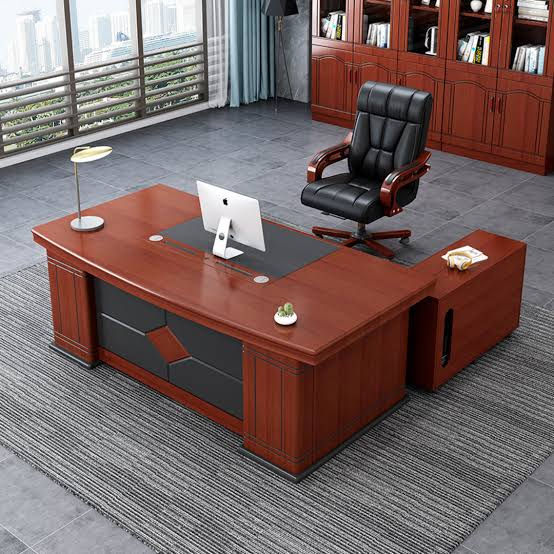
Executive computer desks generally offer a larger working surface and a more formal appearance. They may include storage cabinets, drawers, and dedicated areas for documents or office equipment.
These desks can suit managers, business owners, and professionals who need space for computer work alongside paperwork and meetings.
Before choosing one, confirm that its dimensions suit your office and that the storage arrangement matches your daily requirements.
5. Compact Laptop Desks
Compact laptop desks are designed for users who need a smaller working area. They may suit students, remote workers, and people working in rooms with limited space.
Although compact desks can help save floor space, make sure there is enough room for your laptop, mouse, notebook, and other essential items. Avoid choosing a desk that forces you into an uncomfortable working position.
6. Computer Desks with Shelves
Some computer desks include upper shelves or side shelving for books, documents, printers, and accessories.
These designs can improve organization where floor space is limited. However, measure the entire desk, including its height and shelving depth. Check whether the shelves block windows or interfere with monitors and other equipment.
7. Gaming Computer Desks
Gaming desks are designed for computer setups that may include large monitors, keyboards, headsets, speakers, and other accessories.
If you use a gaming computer for work or entertainment, consider the desktop width, monitor placement, cable management, and available legroom. Check the product's stated load capacity before placing heavy equipment on the surface.
How to Choose the Best Computer Desk
The best computer desk is one that supports your equipment and working routine without wasting space or compromising comfort.
1. Measure Your Available Space
Start by measuring the length, width, and height of the area where you intend to place the desk. Also, check the position of doors, windows, sockets, shelves, and existing furniture.
Leave enough space for your chair to move backward and for you to enter and leave the workstation comfortably.
If you plan to use a corner desk, measure both walls. For a desk with shelves or cabinets, account for the full dimensions rather than measuring only the desktop.
Buying tip: Take photographs of your workspace and record its measurements before contacting Jobel Services. This information can help you discuss suitable desk sizes and configurations.
2. Consider Your Computer Equipment
Your equipment determines how much desktop space you need.
A laptop setup may require only a compact surface, while a desktop computer can need room for a monitor, keyboard, mouse, and accessories. Multiple monitors require additional width and careful positioning.
Before purchasing, list everything you intend to place on the desk. Include printers, speakers, document holders, and other frequently used items.
Then compare the usable desktop dimensions with your equipment measurements. Remember that the advertised overall width may not represent the full usable area if the desk has raised sections or built-in storage.
3. Choose the Right Desk Height
Desk height affects how comfortably you can work. A desk that is too high may cause you to raise your shoulders, while one that is too low can encourage uncomfortable bending.
For a seated workstation, aim for a setup where your shoulders remain relaxed, your elbows stay near your sides, and your forearms are approximately level with the keyboard. Your feet should rest comfortably on the floor or a suitable footrest.
Because users and chairs differ in height, do not rely on one desk measurement for everyone. Consider your chair height and body proportions before buying.
If several people will share the workstation, an adjustable desk may provide greater flexibility where the budget allows.
4. Compare Materials and Construction
Computer desks are available in different materials and finishes. Each option has practical advantages and limitations.
Wood-based boards: These are common in office furniture and can provide a smooth working surface. Their durability depends on board quality, thickness, edge finishing, and support.
Laminated surfaces: Laminated desks often suit everyday work because many finishes are relatively easy to clean. Protect the surface from prolonged moisture and follow the manufacturer's cleaning instructions.
Veneered surfaces: Veneer can provide a wood-like appearance. However, it requires appropriate care to prevent damage from spills, heat, and unsuitable cleaning products.
Metal frames: Metal legs and frames can provide stability when correctly designed and assembled. Check the joints, fasteners, finish, and overall construction.
Compare the quality of the complete desk rather than selecting one based only on its colour or appearance.
5. Check Stability and Load Capacity
Your computer desk should support your equipment without wobbling during normal use.
Inspect the legs, frame, joints, tabletop support, and fasteners. Check that the desk stands evenly on the floor and that the surface does not flex excessively under normal use.
If you intend to place heavy monitors, desktop computers, printers, or multiple screens on the desk, confirm the manufacturer's stated load capacity.
Do not assume that a larger-looking desk can support more weight. Construction quality and the distribution of equipment also matter.
6. Look for Cable Management Features
A clutter of power cables, monitor cables, and chargers can make a workstation difficult to organize.
Some computer desks include cable holes, trays, or spaces for routing wires behind the desktop. These features can be especially useful in offices, computer laboratories, and multi-monitor setups.
Before buying, check the position of your power outlets and the length of your equipment cables. Plan a safe cable route that does not create trip hazards or place unnecessary tension on connectors.
If the desk lacks built-in cable management, suitable cable clips or trays may provide an alternative, provided they are compatible with the desk.
7. Decide Whether You Need Drawers or Shelves
Storage can help you keep frequently used materials within reach. However, extra compartments may reduce legroom or increase the desk's overall dimensions.
Choose drawers if you need to store stationery, documents, and small accessories. Shelves may be more useful for books, printers, and equipment that you access regularly.
If you work mainly with a laptop and cloud-based documents, a simple desk may be sufficient. In contrast, an administrative workstation may benefit from additional storage.
Prioritize useful storage rather than buying features you are unlikely to use.
8. Check Compatibility with Your Office Chair
Your desk and chair should work together to support a comfortable posture.
Check whether the chair fits beneath the desk and whether armrests can pass under the desktop. Ensure that the desk's drawers, support bars, or cabinets do not obstruct your knees.
Also, consider the distance between your eyes and monitor, the position of your keyboard, and the space available for your feet.
If you already own an office chair, measure its seat height and armrest height before purchasing a desk. This simple step can help prevent compatibility problems.
9. Consider Your Room's Layout
The desk should fit into the room without blocking movement or making the space difficult to use.
For a small bedroom, a compact or corner desk may be practical. A large office may accommodate a wider workstation with drawers and shelving.
Think about lighting as well. Position the desk to reduce glare on your monitor, particularly if the room has large windows.
In shared offices, consider whether the desk layout provides enough privacy, cable access, and space for people to move between workstations.
10. Set a Realistic Budget
The price of a computer desk depends on its size, materials, construction, storage features, and design.
Before shopping, decide which features are essential and which are optional. Compare products with similar dimensions and specifications so that you can assess value fairly.
Ask about the tabletop material, frame construction, storage, dimensions, load capacity where available, delivery costs, and assembly requirements.
If you are furnishing several workstations, compare the cost of the full quantity and confirm whether the desks can be arranged consistently in the available space.
Computer Desks vs Office Desks: What Is the Difference?
The terms overlap, but the intended use can help you identify a suitable design.
Feature | Computer desks | General office desks |
Main purpose | Computer-based work and study | General administration, writing, and office tasks |
Equipment | Often planned around monitors, keyboards, and computers | May prioritize paperwork and general workspace |
Common features | Cable access, monitor space, keyboard trays, or equipment shelves | Drawers, cabinets, and broad work surfaces |
Suitable users | Students, remote workers, computer users, and technical staff | Administrators, managers, and general office staff |
Selection priority | Equipment fit, ergonomics, and cable organization | Work surface, storage, and daily workflow |
These are general descriptions rather than strict categories. Many office desks work perfectly well as computer desks if they provide adequate space, support, and comfort.
Common Computer Desk Buying Mistakes to Avoid
Avoid these mistakes when selecting a desk for your office or home.
Buying without measuring: A desk that is too large may block movement, while one that is too small may not accommodate your equipment.
Ignoring chair clearance: Drawers and support bars can restrict legroom and prevent your chair from fitting beneath the desk.
Choosing appearance over construction: Inspect the frame, joints, tabletop, and fasteners before deciding.
Underestimating equipment space: Measure your monitor, computer, printer, and accessories before selecting the desktop size.
Ignoring cable organization: Plan how power and data cables will reach your equipment without crossing walkways.
Buying unnecessary storage: Extra shelves and drawers are only useful when they meet your actual needs.
Overlooking delivery access: Measure doorways, corridors, stairs, and lifts where applicable, especially for large desks.
Failing to confirm specifications: Verify dimensions, material, finish, quantity, current price, and delivery arrangements before payment.
Where Can You Buy Computer Desks in Kenya?
If you are setting up a home office, furnishing a business, or equipping a computer training centre, start by identifying the desk dimensions and features you need.
Jobel Services can be contacted to discuss your workstation requirements and suitable furniture options.
Visit Jobel Services at Gikomba, Beaver House, opposite NCBA Bank, Nairobi.
To make your inquiry more productive, prepare:
The available workspace measurements.
The dimensions and number of monitors or computers.
Your preferred desk design and finish.
Whether you need drawers, shelves, or cable-management features.
Your budget and required quantity.
Photographs of the space and any existing office chair.
Sharing these details can help you discuss suitable options before making a purchase. Confirm current prices, available designs, stock, product specifications, and delivery arrangements directly with Jobel Services.
Frequently Asked Questions About Computer Desks
What is the best computer desk for a small room?
A compact or corner computer desk may work well in a small room. Measure the available area and allow enough space for your chair, legroom, and movement before selecting a design.
What size computer desk should I buy?
Choose a desk that accommodates your computer equipment and provides sufficient working space. Measure your monitors, keyboard, mouse, and accessories, then compare these measurements with the usable desktop area.
What is the ideal height for a computer desk?
The suitable height depends on your body proportions and chair. Aim for relaxed shoulders, elbows near your sides, and forearms approximately level with the keyboard. Check the complete workstation setup rather than selecting a desk based on height alone.
Are computer desks with drawers better?
They can be useful if you need to store documents, stationery, and accessories. However, confirm that the drawers do not restrict legroom or prevent your chair from fitting beneath the desk.
Which material is best for computer desks?
The best material depends on your budget, usage, and maintenance preferences. Compare the tabletop construction, finish, frame stability, and edge treatment rather than judging the desk by appearance alone.
Do computer desks need cable-management features?
Cable-management features are useful when you connect several devices or need a tidy workstation. Cable holes and trays can help organize wires, although external accessories may also work with suitable desk designs.
Can I use a regular office desk for my computer?
Yes. A regular office desk can serve as a computer workstation if it has sufficient surface area, appropriate height, adequate stability, and enough room for your equipment and chair.
Where can I inquire about computer desks in Nairobi?
Visit Jobel Services at Gikomba, Beaver House, opposite NCBA Bank, Nairobi. Bring your workspace measurements and photographs, and confirm the available designs and current prices before purchasing.
Conclusion: Choose a Computer Desk That Fits Your Work
The right computer desk provides a stable, organized, and comfortable place to work or study. To make a suitable choice, compare desktop dimensions, desk height, materials, construction, storage, cable management, and compatibility with your chair.
Most importantly, measure your space and equipment before purchasing. This helps you avoid unsuitable dimensions and choose a workstation that supports your everyday activities.
Ready to choose a computer desk for your workspace? Contact or visit Jobel Services at Gikomba, Beaver House, opposite NCBA Bank, Nairobi. Share your measurements, equipment requirements, photographs, and budget to discuss suitable options before buying.


Comments